ASP.NET Core: The Parts That Bite in Production
Middleware ordering, captive dependencies, HttpClient lifetimes, cancellation, cache stampedes and the .NET 9 APIs worth adopting. The things an ASP.NET Core app only teaches you once it has real traffic.

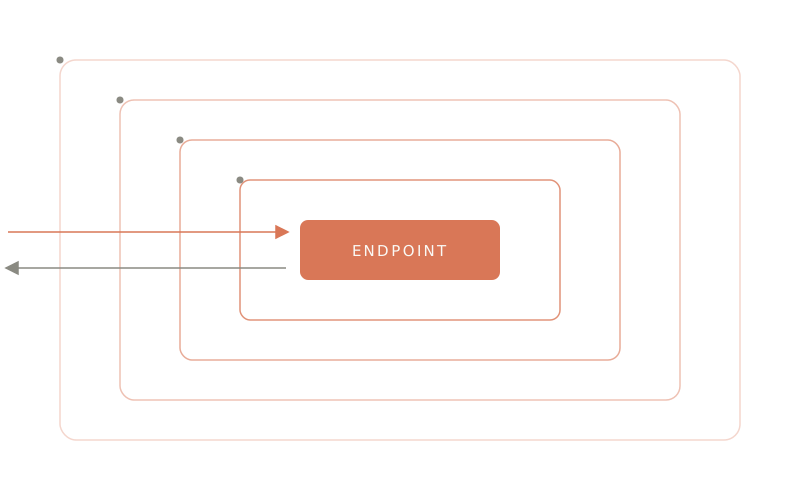
Most ASP.NET Core problems are not framework problems. The framework is fast, the templates run, the tutorial works. Then the app gets traffic and a different category of bug shows up: authorization that never fires, a config change that needs a restart to take effect, a service that exhausts its sockets, a cache that collapses under the first cold start. None of these throw at compile time and most of them do not throw at all they just quietly do the wrong thing.
What follows is the set of things I keep having to explain, with the failure mode for each. Everything here targets .NET 9, which shipped in November 2024 and is supported until 10 November 2026. It is an STS release, so if you are starting something new today, plan the hop to .NET 10 rather than inheriting a runtime that goes out of support this year.


 Referenced throughout
 Jump to Section
- The pipeline order is a contract
- The captive dependency
- Configuration should fail at boot
- HttpClient has a lifetime, and it is not
using - Cancellation is free until you drop it
- Prefer TypedResults
- One place for errors
- Caching: the stampede is the hard part
- Rate limiting ships in the box
- EF Core: four habits
- Logging that survives the log store
- Worth adopting in .NET 9
- Sources
The pipeline order is a contract
Program.cs reads like configuration, so people reorder it like configuration. It is not. Each Use… call wraps the ones registered after it, which means the sequence is the behaviour.

Four of these constraints are stated outright in the documentation, and each one fails silently rather than loudly:
UseCors→UseAuthentication→UseAuthorizationmust appear in that order.UseCorsbeforeUseResponseCaching, otherwise cached responses go out without their CORS headers the bug reproduces only on the second request, which is why it survives code review.UseRequestLocalizationbefore anything that reads the culture, static files included.UseRateLimiterafterUseRoutingwhenever you use per-endpoint[EnableRateLimiting], because the limiter has to know which endpoint was matched. Global-only limiters can go earlier.
The one worth internalising is that exception handling is first in and last out. UseExceptionHandler can only catch what is registered below it, so anything you register above it is outside your error handling entirely.
The captive dependency
This is the most common DI bug in .NET and the container will not stop you.
A singleton is constructed once. Anything it holds a reference to is therefore also alive for the life of the process including services you registered as scoped, which are now scoped in name only.

The options interfaces are where this bites hardest, because their names do not warn you:
| Interface | Lifetime | Use it when |
|---|---|---|
IOptions<T> | Singleton | Value is read once at startup and never changes |
IOptionsSnapshot<T> | Scoped | You want per-request consistency and reload-on-change |
IOptionsMonitor<T> | Singleton | You need current values inside a singleton or a background service |
IOptionsSnapshot<T> is the one that looks right and is wrong. Inject it into a singleton and you get a snapshot taken at first resolution that never refreshes again.
Turn the class of bug into a startup crash instead:
var builder = WebApplication.CreateBuilder(args);

// Development only. This validates the whole graph at build time and
// throws on captive dependencies. It costs startup time, so it is scoped
// to the environment where a crash is cheap.
builder.Host.UseDefaultServiceProvider((context, options) =>
{
    options.ValidateScopes = context.HostingEnvironment.IsDevelopment();
    options.ValidateOnBuild = context.HostingEnvironment.IsDevelopment();
});
Configuration should fail at boot
A missing connection string should stop the process, not surface as a NullReferenceException on the first request that happens to need it. The options builder can enforce that:
builder.Services
    .AddOptions<SmtpOptions>()
    .Bind(builder.Configuration.GetSection("Smtp"))
    .ValidateDataAnnotations()
    .Validate(o => o.Port is > 0 and < 65536, "Smtp:Port is out of range.")
    .ValidateOnStart();
ValidateOnStart() is the whole point. Without it, validation is lazy it runs the first time something resolves the options, which in practice means at 3am on the one endpoint nobody load-tested. With it, a bad appsettings.Production.json fails the deploy, and your orchestrator rolls back instead of serving 500s.
Pair it with a health check and the container never receives traffic it cannot serve:
builder.Services.AddHealthChecks()
    .AddDbContextCheck<AppDb>(name: "db", tags: ["ready"]);

app.MapHealthChecks("/health/live",  new() { Predicate = _ => false });
app.MapHealthChecks("/health/ready", new() { Predicate = c => c.Tags.Contains("ready") });
Liveness and readiness are different questions. Liveness asks “is the process wedged, should you kill it”; readiness asks “can it serve a request right now”. Wire a database check into liveness and one slow query will get your pods restarted in a loop.
HttpClient has a lifetime, and it is not using
HttpClient implements IDisposable, so the natural instinct is to wrap it in a using. That instinct is wrong in both directions, and the two failure modes are opposites:
- Dispose per request and you leak sockets. Each disposed client leaves a connection in
TIME_WAITfor a couple of minutes; under load you exhaust the ephemeral port range and start gettingSocketExceptionon a server that looks idle. - One static client forever and you fix the sockets but freeze DNS. The connection is never re-established, so a failover that changes the DNS record is invisible to your app until it restarts.
IHttpClientFactory exists to hold both ends: it pools the handlers and rotates them on a timer.
builder.Services
    .AddHttpClient<BillingClient>(c =>
    {
        c.BaseAddress = new Uri(builder.Configuration["Billing:BaseUrl"]!);
        c.Timeout = TimeSpan.FromSeconds(30);
    })
    .AddStandardResilienceHandler();
AddStandardResilienceHandler() comes from Microsoft.Extensions.Http.Resilience and adds the five things you were going to write badly by hand: a rate limiter, a total timeout, retries with jittered backoff, a circuit breaker, and a per-attempt timeout in that order, which matters as much here as it does in the middleware pipeline.
One caveat worth knowing: the retry policy will happily replay a POST. If your endpoint is not idempotent, either send an idempotency key or narrow the policy to the methods that are safe to repeat.
Cancellation is free until you drop it
When a client disconnects, ASP.NET Core signals HttpContext.RequestAborted. If you never pass that token down, your app keeps executing the query, keeps holding the connection, and eventually writes a response nobody is listening for. Under a retry storm this is how one slow endpoint takes out the database: every abandoned request is still running.
Minimal APIs and controllers will both bind the token for you. You just have to accept it and forward it:
app.MapGet("/orders", async (AppDb db, CancellationToken ct) =>
    await db.Orders
        .AsNoTracking()
        .Where(o => o.Status == OrderStatus.Open)
        .ToListAsync(ct));
The rule is mechanical: if a method you call takes a CancellationToken, pass yours. ToListAsync, SendAsync, ExecuteUpdateAsync, GetOrCreateAsync all of them take one, and a token that stops at the controller boundary is the same as no token at all.
Prefer TypedResults
Results.Ok(dto) and TypedResults.Ok(dto) render identically. The difference is the static type, and it buys you two things.
app.MapGet("/orders/{id:guid}",
    async Task<Results<Ok<OrderDto>, NotFound>> (Guid id, AppDb db, CancellationToken ct) =>
    {
        var order = await db.Orders
            .AsNoTracking()
            .SingleOrDefaultAsync(o => o.Id == id, ct);

        return order is null
            ? TypedResults.NotFound()
            : TypedResults.Ok(order.ToDto());
    });
First, the OpenAPI document is now generated from the signature rather than from Produces<T> attributes you have to remember to update so the spec cannot drift from the code. Second, the handler is unit-testable without a host: call it, get back a Results<Ok<OrderDto>, NotFound>, and assert on the concrete type instead of casting an IResult and hoping.
One place for errors
Before .NET 8, catching cross-cutting exceptions meant a custom middleware and a try/catch around next(). IExceptionHandler replaced that with something composable:
internal sealed class ConcurrencyExceptionHandler(IProblemDetailsService problems)
    : IExceptionHandler
{
    public async ValueTask<bool> TryHandleAsync(
        HttpContext http, Exception ex, CancellationToken ct)
    {
        // Returning false passes the exception to the next registered
        // handler, and eventually to the default one. Handle only what
        // this class actually knows how to answer.
        if (ex is not DbUpdateConcurrencyException) return false;

        http.Response.StatusCode = StatusCodes.Status409Conflict;

        return await problems.TryWriteAsync(new ProblemDetailsContext
        {
            HttpContext = http,
            Exception = ex,
            ProblemDetails = { Title = "The record changed while you were editing it." }
        });
    }
}
builder.Services.AddProblemDetails();
builder.Services.AddExceptionHandler<ConcurrencyExceptionHandler>();

app.UseExceptionHandler();
Handlers run in registration order, each one deciding whether the exception is its business. AddProblemDetails() gives you RFC 7807 responses for everything nobody claimed, which is what every HTTP client in the world already knows how to parse.
For the exceptions you do not want a dedicated handler for, .NET 9 added a status-code selector, which is enough to stop a downstream timeout being reported to your callers as your own 500:
app.UseExceptionHandler(new ExceptionHandlerOptions
{
    StatusCodeSelector = ex => ex is TimeoutException
        ? StatusCodes.Status503ServiceUnavailable
        : StatusCodes.Status500InternalServerError,
});
That distinction is not cosmetic. A 500 tells a client the request was invalid to retry; a 503 tells it to back off and try again, which is what you actually want when a dependency is slow.
Caching: the stampede is the hard part
Everyone caches. Almost nobody handles the moment the cache entry expires under load a hundred concurrent requests all miss, all call the database, and the database falls over. That is a stampede, and it is why HybridCache exists.
HybridCache arrived with .NET 9 and went GA in March 2025, shipped out of band as Microsoft.Extensions.Caching.Hybrid rather than in the shared framework, so you add the package, and it also back-ports to .NET 8. It layers an in-process L1 over any IDistributedCache L2 (Redis, SQL Server, Garnet). The part you want is that it deduplicates concurrent factory calls: one caller does the work, the rest wait on the same task.
builder.Services.AddHybridCache();

public sealed class CatalogService(HybridCache cache, AppDb db)
{
    public ValueTask<Product?> GetAsync(int id, CancellationToken ct) =>
        cache.GetOrCreateAsync(
            $"product:{id}",
            state: (db, id),
            // static + explicit state means no closure allocation per call,
            // which is the reason this overload exists.
            static (s, ct) => LoadAsync(s.db, s.id, ct),
            tags: ["catalog"],
            cancellationToken: ct);
}

// Publishing a price change invalidates every entry at once.
await cache.RemoveByTagAsync("catalog", ct);
For whole responses, output caching (.NET 7+) is the cheaper tool it short-circuits before your handler runs at all:
builder.Services.AddOutputCache(o =>
    o.AddPolicy("catalog", b => b.Tag("catalog").Expire(TimeSpan.FromMinutes(5))));

app.UseOutputCache();
app.MapGet("/catalog", GetCatalog).CacheOutput("catalog");
Note that output caching is not response caching. Response caching emits Cache-Control headers and hopes something downstream honours them; output caching stores the response on your server and controls it. For authenticated content you almost always want the latter.
Rate limiting ships in the box
Since .NET 7 there is no reason to take a dependency for this, and no reason to write it yourself:
builder.Services.AddRateLimiter(o =>
{
    o.RejectionStatusCode = StatusCodes.Status429TooManyRequests;

    o.AddFixedWindowLimiter("api", w =>
    {
        w.PermitLimit = 100;
        w.Window = TimeSpan.FromMinutes(1);
        w.QueueLimit = 0;
    });
});

app.UseRateLimiter();
app.MapGet("/search", Search).RequireRateLimiting("api");
Four algorithms are built in fixed window, sliding window, token bucket and concurrency. Fixed window is the one to reach for first and the one with the sharpest edge: two bursts either side of a window boundary let a caller through at twice your limit. If that matters, use sliding window.
Also send Retry-After. A 429 without it just tells a client to guess, and clients guess badly.
EF Core: four habits
Read-only queries get AsNoTracking(). The change tracker exists to detect writes. On a list endpoint it is pure overhead, and it grows with the result set.
Project instead of Include. Include fetches whole entities and, with two collection includes, multiplies the rows against each other. A projection asks for exactly the columns the DTO needs:
var orders = await db.Orders
    .AsNoTracking()
    .Where(o => o.CustomerId == customerId)
    .Select(o => new OrderDto(o.Id, o.Total, o.Lines.Count))
    .ToListAsync(ct);
Bulk writes are set-based. Loading ten thousand entities to change one column is ten thousand round trips and a change tracker full of objects. ExecuteUpdateAsync (EF Core 7+) is one statement:
await db.Orders
    .Where(o => o.Status == OrderStatus.Pending && o.CreatedAt < cutoff)
    .ExecuteUpdateAsync(s => s.SetProperty(o => o.Status, OrderStatus.Expired), ct);
The trade-off is real and worth stating: these bypass the change tracker entirely, so no SaveChanges interceptors, no domain events, no automatic concurrency token check. Use them for maintenance work, not for business writes that other code expects to observe.
Log the SQL in development. EnableSensitiveDataLogging() plus a Microsoft.EntityFrameworkCore.Database.Command log level of Information will show you your N+1 problems in about thirty seconds. Never enable it outside development. It writes parameter values, and parameter values are usually personal data.
Logging that survives the log store
logger.LogInformation($"Order {id} shipped") is three mistakes in one line. It allocates and formats the string even when Information is disabled, and it destroys the structure the log store receives a unique sentence per order instead of a template with a field you can query.
The source generator solves all three at compile time:
internal static partial class Log
{
    [LoggerMessage(
        EventId = 1001,
        Level = LogLevel.Warning,
        Message = "Payment {PaymentId} declined by {Provider} after {Attempts} attempts")]
    public static partial void PaymentDeclined(
        ILogger logger, Guid paymentId, string provider, int attempts);
}
No boxing, no formatting unless the level is enabled, and PaymentId arrives in your log store as a field you can filter on. The interpolated version arrives as text.
The other half is scope. Attach the correlating identifiers once and every log line beneath inherits them:
using (logger.BeginScope(new Dictionary<string, object> { ["OrderId"] = order.Id }))
{
    // everything logged in here carries OrderId
}
Worth adopting in .NET 9
Four changes I would act on the day you move to 9, in rough order of how much trouble each one saves.
The [AllowAnonymous] analyzer. This is the only item here that is a security fix, and it earns the top of the list because the bug is invisible on inspection. An [AllowAnonymous] attribute farther away from an action beats an [Authorize] attribute closer to it. A base class or a controller-level attribute silently opens up the endpoint underneath. Relative order is what counts, not proximity:
[AllowAnonymous]
public class MyController
{
    [Authorize] // Overridden. This endpoint is public.
    public IActionResult Private() => null;
}
.NET 9 ships an analyzer, ASP0026, that flags exactly this. Build once, read the warnings, and check every hit against what you thought was protected. Where the override is deliberate, repeat [AllowAnonymous] after the [Authorize] to say so and the warning goes away.
Built-in OpenAPI, no Swashbuckle. Document generation moved into Microsoft.AspNetCore.OpenApi: AddOpenApi() plus MapOpenApi(), served at /openapi/v1.json, with document, operation and schema transformers for the customisation you used to write filters for. It supports trimming and native AOT, which Swashbuckle does not. You can also emit the document at build time with Microsoft.Extensions.ApiDescription.Server, which means the spec becomes a build artefact you can diff in code review and break the build on.
MapStaticAssets() instead of UseStaticFiles(). A drop-in replacement that does the production work most teams never got around to: compression at build time, fingerprinted filenames, ETag and immutable caching headers. It works for Blazor, Razor Pages and MVC alike, and it removes a whole class of “users are on a stale bundle” tickets.
Stop measuring your health checks. Metrics from endpoints that a load balancer hits every two seconds swamp the ones you care about. [DisableHttpMetrics] on a controller, or .DisableHttpMetrics() when mapping the endpoint, drops them out of the histogram.
The through-line
Almost everything above is the same shape of mistake: something that is lazy, implicit or deferred when it should be eager, explicit and checked at startup. Validate configuration at boot, not on first use. Make the response type part of the signature, not an attribute. Let the container prove your lifetimes are sound before it serves traffic. Pass the cancellation token instead of assuming nobody hangs up.
Production is where the deferred bill arrives. Pay it at startup instead.
Sources
- ASP.NET Core Middleware: middleware order
- What’s new in ASP.NET Core in .NET 9
- HybridCache is now GA
- HybridCache library in ASP.NET Core
- Generate OpenAPI documents in ASP.NET Core
- .NET support policy
Brand marks in the strip above are from Simple Icons, released under CC0 1.0 and recoloured to this site’s palette. Both diagrams are my own.